Canopy
An operating-system admin I built first for the studio that ships it, then deployed as install zero for a real client. The Star Auto Service in Richardson, TX is the first external Canopy. It is more than a hundred and seventy screens now: the pipeline and the mailbox and the phone line and the job file and the invoices and the analytics, all on the client's own domain, behind their own sign-in, carrying their own name. A productized engagement, as a one-time build or a monthly subscription, delivered in about four to eight weeks.
Built first for myself to run DBJ Technologies. The Star Auto Service is install zero, the proving ground for the architecture behind the productized Canopy engagement.
The Problem
Most small businesses are running on a stack of separate SaaS subscriptions that do not talk to each other. Analytics in one tool. Performance monitoring in another. Error tracking in a third. Deliverability scattered across whatever email platform got chosen. A CRM nobody updates. Spreadsheets bridging the gaps. Each tool charges a monthly fee. Each tool owns the data. Each tool has its own login, its own admin UI, its own export limitations, its own 'we are sunsetting that feature' email. The cost compounds. The data fragments. And the buyer never gets the one thing they actually need: a single picture of their business that joins what marketing did to what customers actually became. The standard advice is 'just use the integrations.' But the integrations break, the integrations stop being free, and the integrations leave the data in someone else's data center. By the time a small business is spending hundreds to thousands a month on SaaS subscriptions for capabilities a single install could cover, the architectural alternative is no longer obvious. It just looks like the cost of doing business. It is not the cost of doing business. It is the cost of accepting SaaS sprawl as inevitable.
What You Get
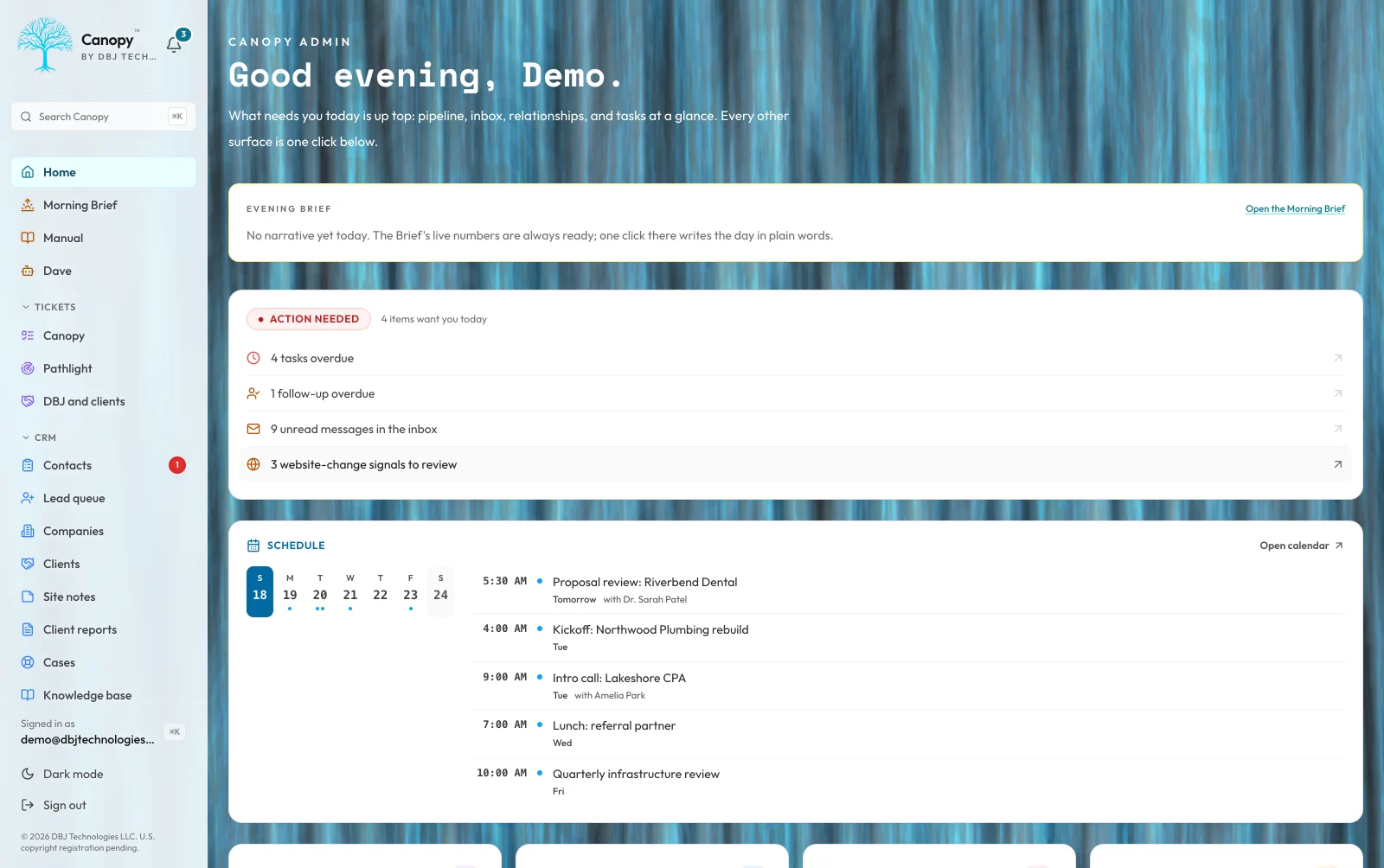
One dashboard. One auth wall. One source of truth. On the buyer's domain, in the buyer's database, behind the buyer's auth. Canopy is the operating-system admin I built first to run DBJ Technologies, then shipped as the first external install to The Star Auto Service. Same codebase, same architecture, configured per install. Visitors, recurring users, funnels, search behavior, performance metrics, deals, contacts, companies, quotes and proposals, forecasting by person and territory, a synced calendar with public booking pages, the mailbox on Gmail or Microsoft 365, the business line's calls and texts, the job file with its plans, logs, schedules and map, invoices, online payments and QuickBooks, the client portal, sequences, workflow rules and approvals, the assistant, infrastructure health, deliverability, error volume, and budget headroom all live in one place, on a computer and in the phone app. The buyer logs in to one URL, sees one banner that summarizes the worst of every signal across the whole stack, and drills into whichever section needs attention. Concretely, these are the subscriptions it stands in for, and the reason the count is a range rather than a number: an analytics platform, a real-user-monitoring tool, an error tracker, an uptime and domain monitor, a CRM, a scheduling tool, an email-sequence tool, an invoicing tool, a field-service app with photo storage, a call-screening or answering service, a client portal, and a reporting tool. Nobody is running all twelve. Most buyers are running eight or nine of them and paying for the tenth out of habit. Nothing is rented. The Postgres database is the buyer's. The auth wall is the buyer's. The domain is the buyer's. The audit log captures every meaningful change so a wrong update is recoverable. The architecture is per-install, not multi-tenant, so there is no shared infrastructure to leak across customers and no vendor to call when something breaks. The film and the stills on this page are from October 2026: the admin itself on a demo install that runs a fictional book of business, and, for two screens, the guided tour linked below, which walks the same product with the same fiction. A hands-on sign-in to that demo install is a request away on the contact page. I built it for myself first, which means every decision is the one I made when the customer was me.
Analytics & Performance
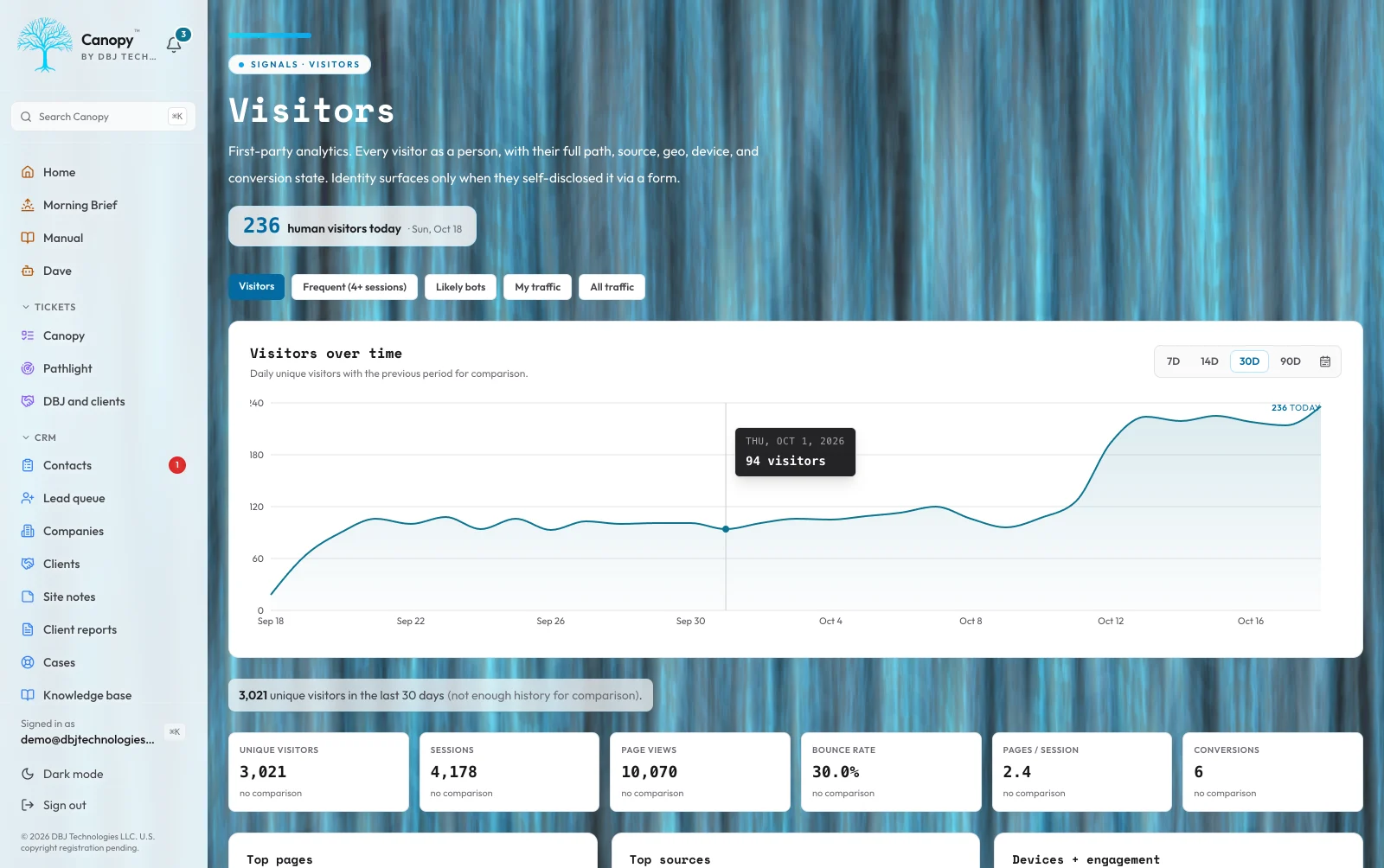
Buyers spend on analytics platforms, real-user-monitoring tools, and search-insight services and still cannot answer the question that matters: which visitor became which customer. Canopy captures first-party visitor data, recurring-user behavior, conversion funnels, search queries, and Web Vitals directly into the buyer's Postgres. Every event is timestamped and queryable. Performance data lives next to the conversion data, in the same database, with the same auth gate. When a regression shows up after a deploy, the buyer sees it in the same dashboard where they review pipeline. No browser-tab switching. No SaaS-to-SaaS export reconciliation. No quarterly conversation about whether the analytics tool's numbers and the CRM's numbers agree. They are the same numbers, in the same database, owned by the same buyer. The honest exclusion: Canopy is not built for systems with billions of events per day. It is built for small businesses doing thousands to tens of thousands of events per day, where architectural ownership matters more than horizontal scale.
Read the full architecture of Analytics & Performance →
The question I asked first: what changes when the visitor data and the conversion data live in the same database under the same auth gate. The answer is the kind of question you can ask. With third-party analytics, you can ask 'what was my bounce rate last week.' You cannot ask 'of the prospects who became deals last quarter, which marketing source did they come from, and what was their median time to close.' That second question requires joining two systems that the SaaS contract does not let you join, and the export reconciliation that pretends to support it never quite agrees. I considered the standard stack: an analytics SDK on the front end, the CRM through its API, a webhook bridge between them. I rejected it because every layer rents access to the buyer's data back to the buyer, and the bridge is what breaks first. What Canopy does instead: the visitor capture writes directly to the buyer's Postgres. The conversion capture writes there too. Web Vitals, scroll depth, and dwell time post to the same table. Bot pressure is separated from real visitors at the ingest layer so the headline numbers stay honest. The dashboard reads from already-aggregated views so it stays fast as the data grows. The operational consequence: when a regression shows up after a deploy, the buyer can answer 'is this real or just bot pressure' against the same database that holds pipeline. No browser-tab switching. No quarterly meeting about whose numbers agree.
Continued at /work/canopy/analytics
Pipeline & Relationships
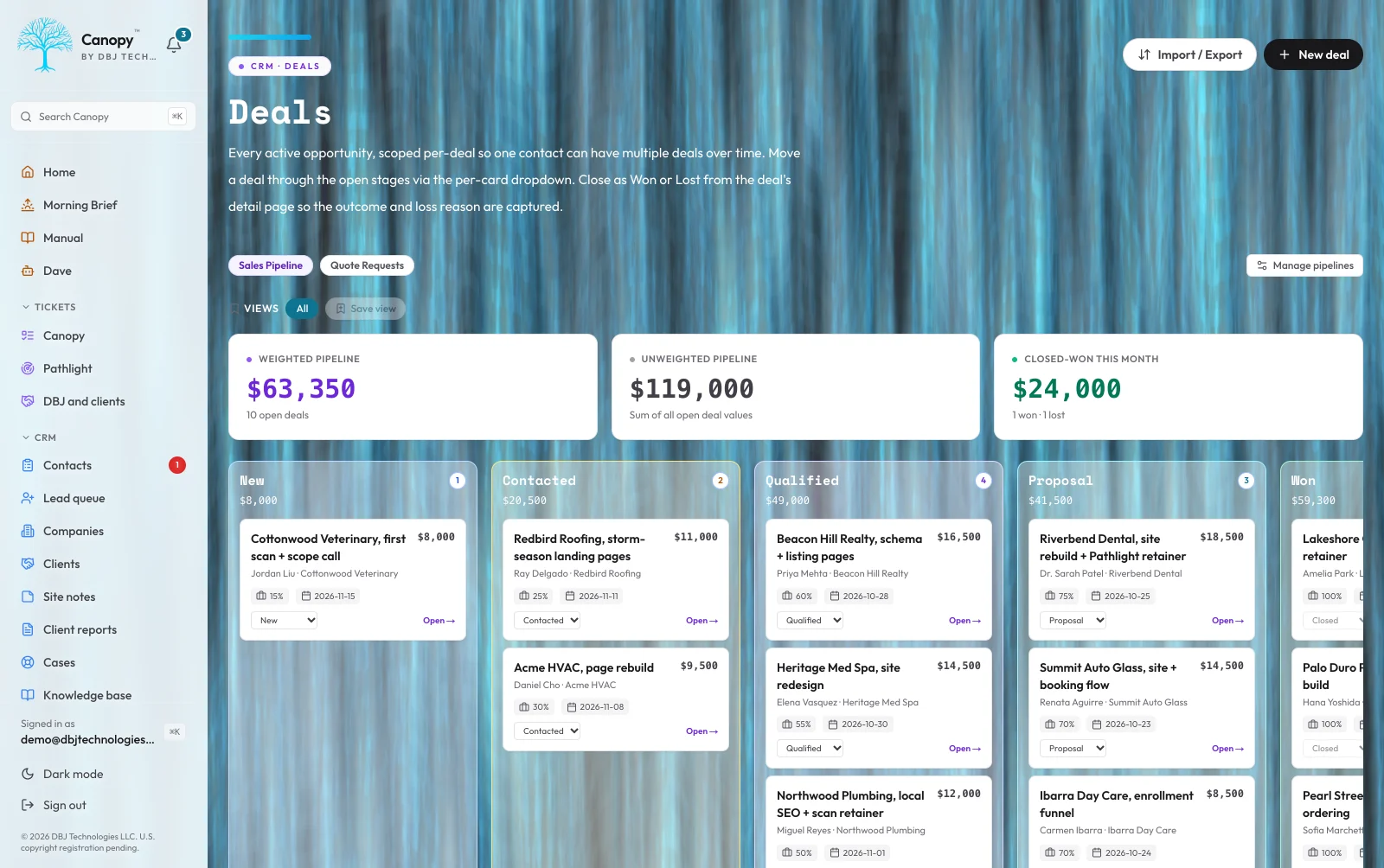
Deals scattered across spreadsheets. Follow-ups falling through the cracks. Contact records last updated whenever the team remembered. The CRM that nobody updates is the most expensive software a small business can buy, because it produces no value at full price. Canopy is deal-stage primary. The pipeline kanban board is the source of truth for where every prospect stands. The contact detail view brings together every interaction the buyer has ever had with that person, automatically: form submissions, scan reports, email replies, calls logged, notes added, deal-stage transitions. Nothing has to be manually copied between systems because there are no other systems. Bulk actions handle the repetitive operations. Keyboard navigation works the way an operator who lives in the tool every day expects it to work. Every change writes a before-and-after snapshot to the audit log, so the question 'who marked this deal closed-lost and when' has a definitive answer instead of a Slack thread. Quotes and line items build off a shared product catalog, where a product can be a bundle with price tiers. More than one pipeline can run at once, each with its own stages and a flag when a deal has sat too long. Territories, a reports-to line and a forecast that rolls up by person and by territory came later, along with the kinds of record a business defines for itself. Duplicate contacts merge cleanly, a global search reaches every record, and when a prospect has been scanned, what the scan learned about their business shows up right on the contact. The pipeline rolls up weighted forecasts. The contact timeline reconciles with the audit log. The data is the buyer's, and the buyer's team can leave whenever they like and take the whole database with them.
Read the full architecture of Pipeline & Relationships →
The question that drives the data model: what does it mean to say a CRM is 'the source of truth.' For most small-business CRMs the answer is 'whatever the most recent person to touch the record typed in.' That is not truth, that is the latest belief. Canopy treats truth as the audit log. Every meaningful change writes a before-and-after snapshot attributed to the user who made the change. The current state of any record is the projection of those events. The implication is the database can answer questions the team did not know to ask when they wrote the record, because the events are still there to replay. I considered making contact status the primary axis, with deal as a derived field on the contact. I rejected that because every real business has repeat customers and parallel opportunities. Collapsing deal state into contact state loses the second engagement, and the second engagement is where most of the revenue lives. So deals are primary; contact status is a denormalized mirror kept for backward compatibility, not the source of truth. The contact detail view brings together every interaction the buyer has ever had with that person, automatically. Form submissions, email replies, scan reports, calls logged, meetings booked, notes added, deal-stage transitions, all on one timeline. Nothing has to be manually copied between systems because there are no other systems. The operational consequence: a team member leaves, the database stays. The questions are queryable. The answers are verifiable. The export, if one ever happens, is the buyer's database itself.
Continued at /work/canopy/pipeline
Automation
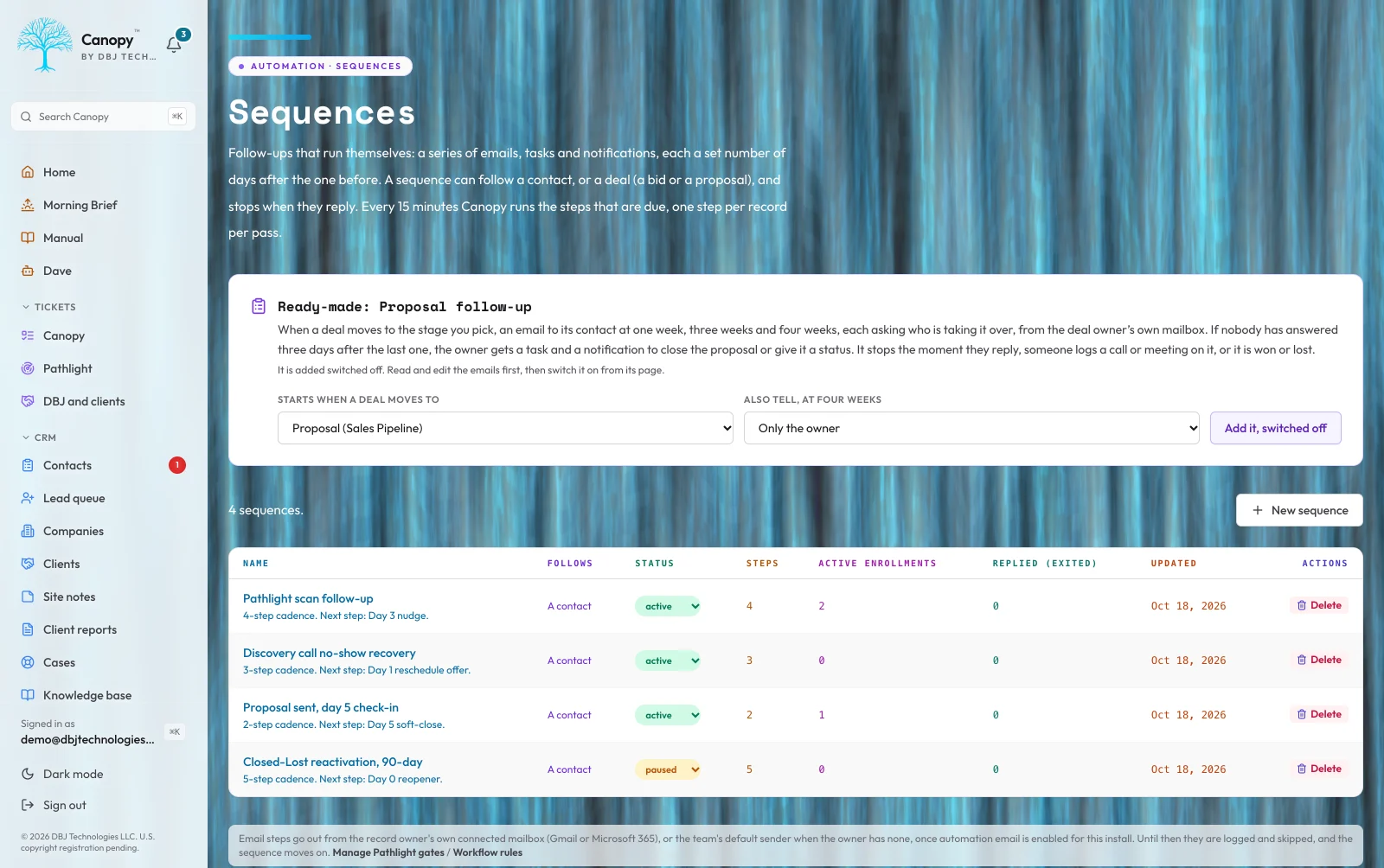
Manual follow-ups are how revenue leaks. The calendar reminder gets dismissed. The 'I will email them tomorrow' never happens. The deal-stage change does not trigger any of the things that should follow from it. Canopy runs sequences, workflows, and rule-based automations on top of the audit log. Sequences send multi-step outbound with reply-exit, so a prospect who replies stops receiving the next message in the chain. Workflows fire on domain events: a new deal hits a stage, an old deal goes silent for an extended window, a scan report flags a finding worth a follow-up. Rules condition on what changed in the audit log, which means I can express 'any time a deal moves to proposal, send the proof-of-craft email and assign a follow-up task' without writing custom code. Email templates are each teammate's own, with merge fields that refuse to send half filled. Bulk actions cover the cases where automation is overkill. Every automated action writes to the audit log with the rule that fired it, so when something automates that should not have, the answer is one query away. Workflow rules are built visually, with and-or conditions and if-else branches, no code required, and a sequence step can test what happened and branch, forward only. An approval process holds a deal, quote or invoice until a manager signs off. In-app notifications and teammate mentions keep the team in the loop, and each person can save their own filtered views of the pipeline. The honest exclusion: this is not a marketing automation suite for thousand-step lifecycle programs. It is built for small-team operators who need the next ten things to happen without remembering them.
Read the full architecture of Automation →
Two ways to wire automation rules: as side-effects on the writer's path, or as subscribers to a durable event log. I chose the second. Every mutation in Canopy writes to the audit log first; rules read from the log and act. That is slower by a few hundred milliseconds than firing rules inline. It is also the reason a rule that fires wrong is recoverable. The action records the rule that fired it. The mutation records the actor. The audit log holds both. So the question 'why did this email send' has a query, not a debugging session against a vendor's internal logs. I considered a no-code automation builder with hundred-step branching lifecycle programs. I rejected it because the operator who needs that already bought Hubspot. The operator who has not bought anything yet needs the next ten things to happen without remembering them, not a hundred-step program nobody in the building understands by month four. The mechanism: sequences are multi-step outbound with reply-exit, so a prospect who replies stops receiving the next message in the chain. Workflow rules condition on what changed in the audit log. Email templates are versioned so I can roll one back without losing the send history. The honest exclusion: this is not lifecycle marketing software. It is built for small-team operators who need automation to be a memory aid, not a strategy. When something automates that should not have, the rule that fired is one query away from explaining itself.
Continued at /work/canopy/automation
Operations & Health
Most small businesses cannot answer 'is everything okay right now' without checking five separate dashboards. The deploy status is in one place. The error volume is in another. The TLS certificate expiry is in nobody's hands. The deliverability is whatever the email provider's last bounce report said. The cost picture is a spreadsheet someone updates monthly. Canopy collapses all of it into one banner at the top of the dashboard. Worst of every signal, green when everything is fine, amber when something needs attention this week, red when something needs attention right now. Drill into the banner and the relevant subsystem opens with the underlying data: per-domain TLS expiry, WHOIS expiration, email-authentication status, real-time deliverability, function-level error volume, real-time spend against the configured budget ceilings. The infrastructure-health checks run on a daily cron and write to the audit log, so a domain's TLS certificate going to expire gets surfaced well before it does. If deliverability degrades because a sender domain's authentication failed validation, the banner reflects it on the next check. The whole point of operations telemetry is to interrupt the operator when it matters and stay quiet when it does not. Outbound sits beside it: everything the install is set to send to anyone, each beside its switch, and every switch off on a new install. And the install keeps its own nightly encrypted archive, restored on a schedule to prove it can be. Operations is not a dashboard you visit. It is a banner you trust.
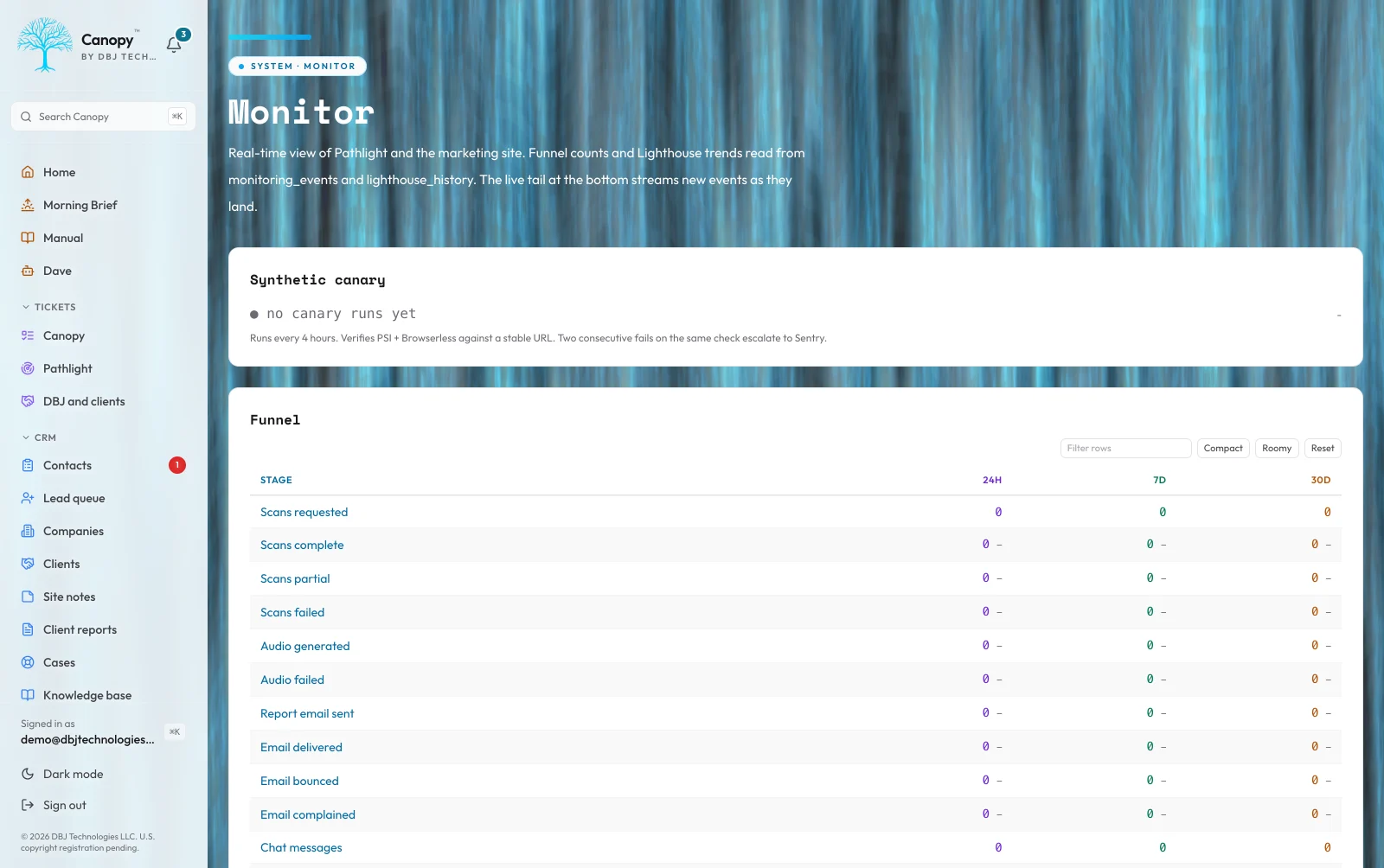
Read the full architecture of Operations & Health →
The question that shaped the surface: what does an operator actually need to see, and what is just dashboard porn. Most operations surfaces try to show everything. Five graphs, twelve gauges, a dozen widgets. The operator either trains themselves to ignore the page or they panic-respond to whichever gauge happens to be yellow. Neither outcome ships. I built Canopy's operations surface around the inverse discipline: stay quiet until something matters. The default state is one banner that summarizes the worst signal across the entire stack. Green means everything I bother to monitor is fine. Amber means something needs attention this week. Red means something needs attention right now. The operator visits the dashboard for the work they came to do, not because the operations page demanded their attention. I considered always-on real-time alerting. I rejected it because most small businesses get three alerts and then mute the channel, and a muted channel is worse than no channel because it manufactures false confidence. Daily cron is enough for everything I check at the operations layer: certificate expiry, domain expiry, email-authentication posture. Real-time is reserved for the signals that genuinely change minute-to-minute, deployment health and email deliverability among them. The failure mode I built against: a TLS cert expiring at two in the morning. The banner reflected that risk on the previous day's check, before any visitor hit a broken site. The buyer was warned in working hours, when warnings can become tickets instead of incidents.
Continued at /work/canopy/operations
Pathlight Integration
Pathlight is the website-diagnostic platform DBJ runs as the top of its sales funnel. Canopy is where Pathlight's signals become operator workflows: prospecting candidate research, change monitoring on existing customer sites with manual rescan triggers, competitive-intelligence scans on direct competitors of the buyer. Every Pathlight call from inside Canopy passes through guardrails before it fires. Spending limits, scope rules, and trigger conditions all have to clear; if any one blocks the call, nothing fires and the operator sees why. The buyer never gets a surprise bill from a runaway loop because the architecture does not allow runaway loops. Prospecting candidates flow into the pipeline with their scan context attached. Change-monitoring alerts surface in the operations banner. Competitive scans are stored next to the prospect record so the next conversation has context. The integration is opt-in, monitored, and capped, which is the only way a per-call cost item belongs in a productized engagement. The honest exclusion: this integration is bundled with Canopy, not sold separately. Pathlight as a standalone product has its own surface. This section describes how Canopy uses it.
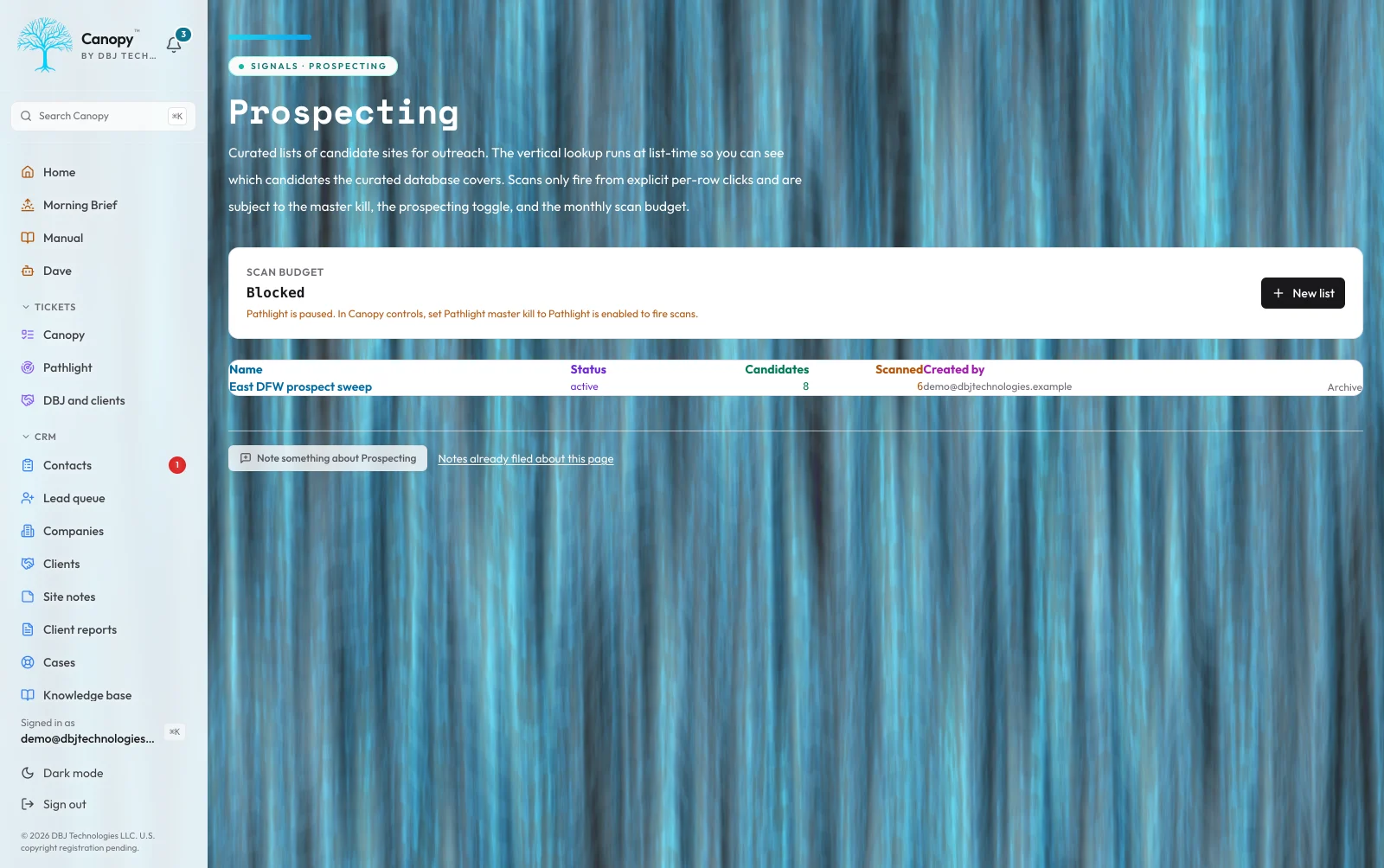
Read the full architecture of Pathlight Integration →
The question that gates this section: how do you let an operator press a button that costs the studio real money, without exposing the buyer to a runaway bill. The answer is guardrails that all have to clear: spending limits, scope rules, and trigger conditions, each one capable of stopping the call. If any one blocks the call, nothing fires and the operator sees why. The buyer never gets a surprise bill from a runaway loop because the architecture does not allow runaway loops. I considered scheduled background scans with usage-based billing. I rejected that because per-call cost runs to runaway loops faster than any other line item I have ever shipped, and a small business cannot absorb 'the system scanned eight hundred sites in your sleep, your bill is four hundred and eighty dollars.' The honest framing: a per-call external charge belongs in a productized engagement only when it is a known monthly maximum, not a wild-card. The failure mode I most carefully guarded against: two admin clicks at the same instant when the budget has one scan of headroom remaining. Both passes have to not pass. Atomic check-and-reserve, not check-then-reserve. One scan fires, the other gets a user-facing block. The operational consequence: the per-call line item is a known monthly maximum, every month, by construction.
Continued at /work/canopy/pathlight
Mail and the Phone Line
Two things sit outside every CRM a small business has ever bought: the inbox, and the phone. So the follow-up lives in one place, the thread that explains it lives in another, and the call that started the whole thing lives nowhere at all. Canopy holds both. The mailbox is mirrored, not replaced: the real account stays the real account, and marking something read here marks it read there. Every message threads to the person it came from, a client's whole correspondence gathers itself on their file by domain so a thread that predates the CRM record still shows up, attachments arrive with the message, and spam is marked rather than hidden, because the one message a filter buried is the one somebody is looking for. The phone line is screened before it rings. Blocking spam callers one at a time never converges, because a dialer spoofs a fresh caller ID on every call and every block lands on a number that no longer exists. So the default is inverted: known numbers ring straight through and never hear a thing, and everybody else proves they are a person, says who they are and what they want, and arrives with a one-line summary whispered to the operator as the call connects. Every call is logged with its transcript and what the carrier actually billed for it. The line's texts live in Messages, one conversation per number, a text that names a meeting offers to put it on the calendar, the Call page places a call from the business line, and on a phone with the Canopy app the line rings in the app itself. Nothing auto-blocks, ever, because a wrong block silently drops a real client and they get no signal it happened. And if the screen is switched off or anything in it fails, calls forward straight through unscreened. A broken screen behaves exactly like not having one.
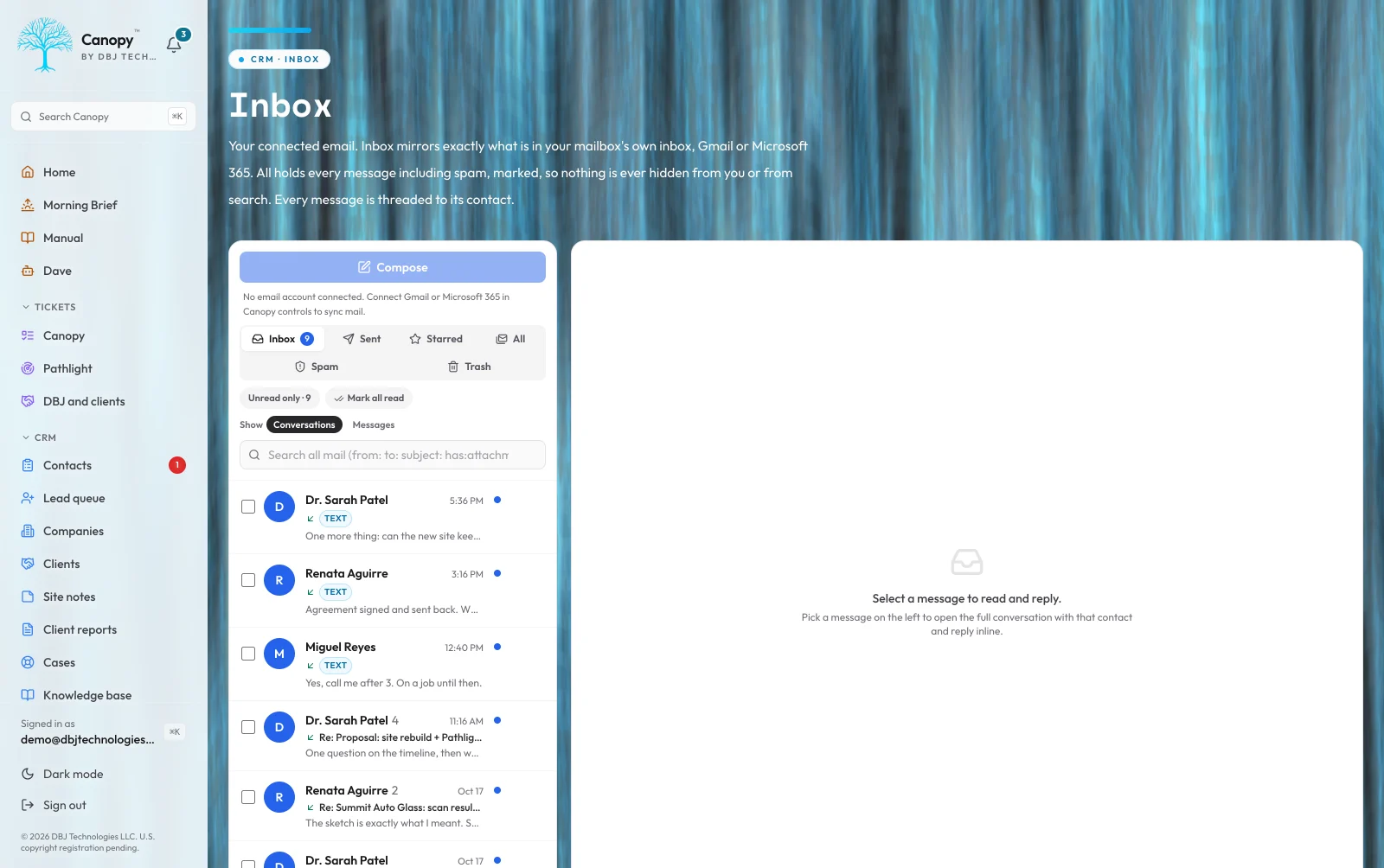
Read the full architecture of Mail and the Phone Line →
The question underneath this section: what is a system of record worth when the two channels the business runs on both sit outside it. The answer is that the mailbox is mirrored rather than replaced, and the phone is screened rather than blocked. Reading a message in Canopy marks it read in the real account, so working inside the CRM does not double the work. Mail gathers onto a contact by address, so correspondence that predates the record still lands on the file. I considered making Canopy the mail client outright. I rejected that on two counts: an operator will not abandon a mail client they are fast in to gain a CRM benefit, and putting the buyer's correspondence inside my software makes the ownership claim weaker rather than stronger. The failure mode I most carefully guarded against: a screen that decides on its own. Nothing auto-blocks, ever, because a wrong block drops a real client silently and they get no signal it happened. They believe nobody answered. The screen filters and summarizes; it never decides. And if anything in it fails, calls forward through unscreened, so a broken screen behaves exactly like not having one. The operational consequence: the follow-up, the thread that explains it, and the call that started it are on one file, put there by the work rather than by somebody remembering to file it.
Continued at /work/canopy/mail
Into the Field
A deal has no address, no photos and no crew. So a business whose work happens at a property ends up running a CRM for the sale and a separate field app for the job, with a spreadsheet reconciling them and a phone full of photos nobody can find. Canopy has a job file: one piece of work at one address, carrying the customer, the property, the trades, the priority, the owner, and a milestone strip that writes its own history as the work moves. Underneath, a job is a deal with a job record attached, which is the part that matters: every money, file, email, calendar, automation and reporting feature already in the product works on a job from day one, because they all key on the same record. Nothing about jobs is a separate island. The photo wall is built for the roof rather than the desk. Photos are ordered by when they were taken, not when they uploaded, so a set that went up in three batches still reads in the order the work actually happened. Albums and tags are edited in place. And a photo shot with no signal is not lost and is not waiting on anyone: it is stored on the phone the moment it is chosen and uploads itself when coverage comes back, whether or not the app is still open. Shoot the roof, drive back into range, and it arrives. Plans are viewed and measured on the phone, the day's log is signed by the foreman, schedules put crews and equipment on a week board, and a map shows every job as a pin coloured by its milestone. The whole admin works on a phone, installed from the site with no second password, and as DBJ Canopy, the app in the App Store, which opens the same pages and adds what only a phone can.
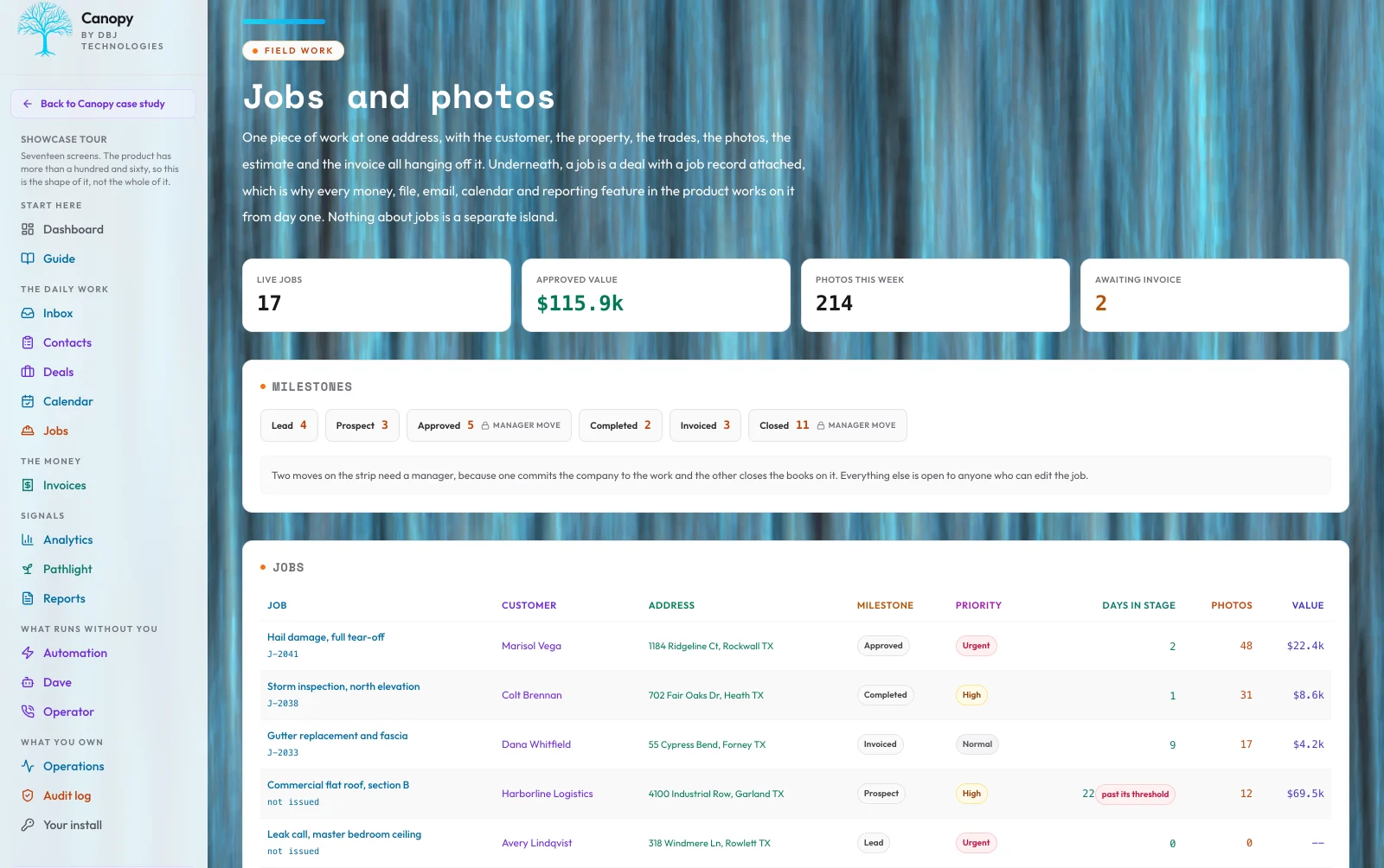
Read the full architecture of Into the Field →
The question that shaped this section: what a deal record is missing when the work does not happen at a desk. The answer is that a job is a deal with a job record attached, not a new kind of record. Every money, file, email, calendar, automation and reporting capability already in the install works on a job from its first day, because they all key on the same record. I considered building field work as its own module with its own records, which is the usual shape. I rejected it because every existing capability would then have to be extended to know about jobs, one at a time, forever, and the parts that lagged would be invisible until an operator went looking for them. The failure mode I most carefully guarded against: the photograph taken where there is no signal. A roof, a basement, a rural property. The photo is written to the phone the moment it is chosen and uploads itself when coverage returns, whether or not the application is still open. The crew member's job is to take the picture, and that is the whole of their job. The operational consequence: no spreadsheet in the middle, because there are not two systems to reconcile. The sale, the work, the evidence, the invoice and the margin are one continuous record.
Continued at /work/canopy/field
The Money, and the Record That Goes With It
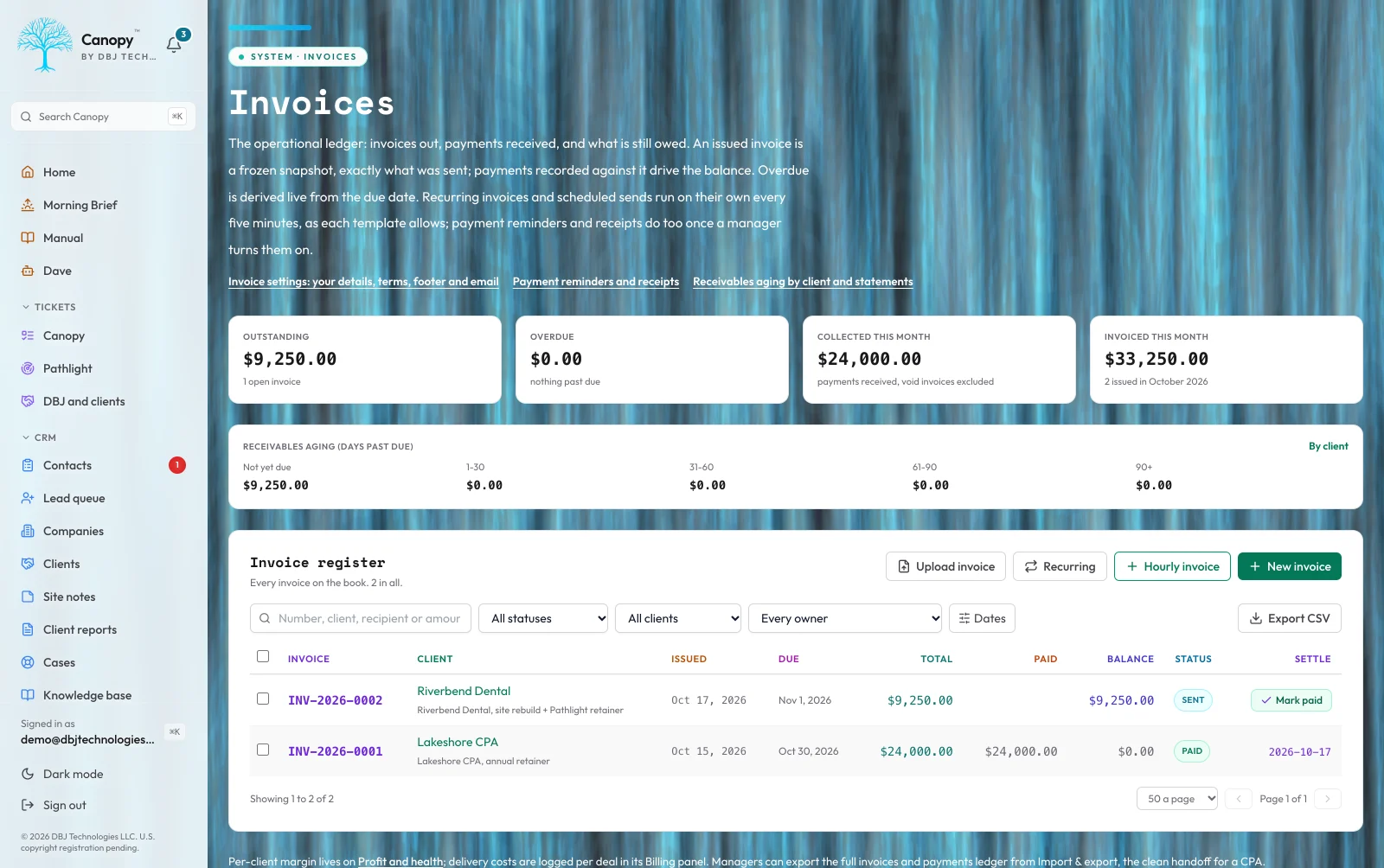
Most small-business CRMs stop at won. Everything after that, the invoice, the payment, what the work actually cost to deliver, and the report the client is owed at the end of the month, goes back to a spreadsheet and a word processor. Canopy runs the rest of it. A quote becomes an invoice, an invoice freezes the moment it is issued and its PDF never changes again, and the payments recorded against it walk it through its own status without anybody setting one. A correction is a void with a reason and a reissue under a new number, never a quiet edit of the document somebody already has. Recurring reminders fire on their due morning and then re-schedule themselves, so a missed day fires once and keeps the original calendar. Overdue is computed from the due date every time the page renders, not by a background job that might not have run. Delivery cost is logged against the work it belongs to, hours or expenses, so the margin on a client is a number that can be read rather than a number that gets assumed. Profit and health puts cash received next to what was tracked to earn it, with a twelve-month chart and a per-client table beside it. And the monthly client report is assembled from what the install already holds. The part I care most about is what it does when it has no answer: a section with nothing in it stays on the page and says which kind of nothing it is. Measured means the answer is here. Nothing this period means I looked and there genuinely was none. Cannot measure means I cannot see that for this client at all. They are three different claims, and a section that vanished the month its number got worse reads to a client as something being hidden. A client pays online from the private link on every issued invoice, and the payment lands on the invoice by itself. The honest exclusion: the costs side counts what Canopy itself tracks, so the margin is a read over your own operating data, not a books-grade number. The ledger exports to CSV for whoever does your books, or pushes into QuickBooks Online one way, every hour.
Read the full architecture of The Money, and the Record That Goes With It →
The question that opens this section: what happens to a small business at the exact moment its CRM says the word won. What happens is the software stops and the spreadsheets start. So Canopy runs the rest: a quote becomes an invoice, an issued invoice freezes and its PDF never changes again, and recorded payments walk it through its own status without anybody setting one. I considered letting an invoice stay editable, which is what a word processor gives you for free. I rejected it because a financial document is a claim somebody else is holding a copy of. A correction is a void with a reason and a reissue under a new number, never a quiet edit of a document already in a client's inbox. The failure mode I most carefully guarded against: a background job that decides what is overdue. If the job does not run, the aging report looks healthy and nothing indicates the number is stale. Overdue is computed from the due date every time the page renders, so it cannot be wrong about the calendar. The honest exclusion: the cost side counts what Canopy itself tracks, so the margin is a read over your own operating data, not a books-grade number. It exports to CSV for whoever does the books. The operational consequence: the chain from quote to margin has no gap where a number gets retyped, rounded or forgotten.
Continued at /work/canopy/money
An Assistant, on a Leash
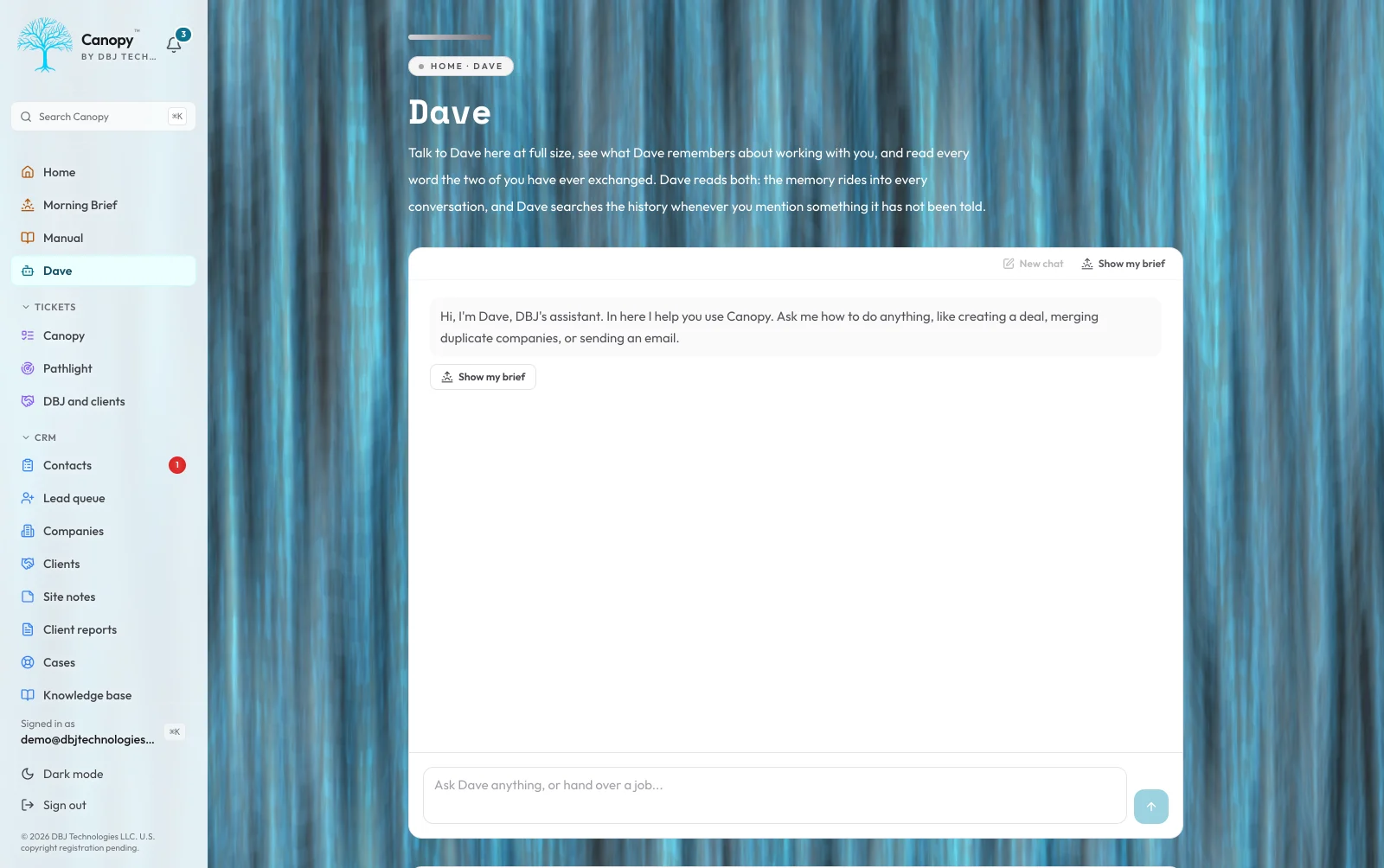
An assistant that can read your business is genuinely useful. An assistant that can change it without asking is a liability somebody else has to clean up. Canopy treats those as two different decisions, and it ships with the second one off. Out of the box the assistant reads. It answers from your actual records, scoped to exactly what your own sign-in could already see, and it is instructed to look the relevant thing up before explaining why something looks wrong, and to say plainly that it cannot see something rather than offer a cause it has not checked. Letting it act is switched on lane by lane. The safe lane runs immediately and is made safe by construction: each action is reversible, touches one record, is capped per message, and lands in the audit log under your name. The lanes that delete anything or send anything never act at all. They build a card from a fresh read of the record, show exactly what will happen, and wait for a click. Cards are single-use and they expire. The rule underneath all of it: the assistant acts only on what you type. Content inside a record, an inbound email, a note, an imported field, can never authorize an action, and the confirm-first lanes hold regardless. Every AI call clears the same three independent checks that guard a paid scan, including a monthly budget in dollars that starts at zero, and every call is metered down to what it cost. Hand it a goal and it carries it step by step, as you, under the same lanes, parking the moment a step needs your click; that switch, like every switch that lets it do more, ships off. The honest exclusion: this is not an agent you hand the business to. It is a fast reader with a short leash, and the leash is a setting you control.
Read the full architecture of An Assistant, on a Leash →
The question that decided the shape of this feature: what should an assistant with access to a business be allowed to do on its own. Nothing, until the buyer says otherwise, one capability at a time. Out of the box it reads, scoped to exactly what that person's own sign-in could already see. Letting it act is switched on lane by lane. I considered the general-purpose agent, given broad write access and trusted to use judgment. I rejected it because the buyer is a small business with no security team and no staging environment. The failure mode of a broad agent is not a crash; it is a plausible-looking wrong action taken across forty records at two in the morning and discovered a week later by a client. The failure mode I most carefully guarded against: an instruction arriving as content. An inbound email, a note, an imported field, a name a stranger typed into a form. None of them can authorize an action, and the confirm-first lanes hold regardless of what any of them say. Data is data. Only the person typing is the person. The honest exclusion: this is not an agent you hand the business to. It is a fast reader on a short leash, and the leash is a setting you control. The operational consequence: the useful ninety percent on day one, with every irreversible action behind a click you made or a switch you turned on.
Continued at /work/canopy/assistant
Your Brand, Your Modules, Your Name On It
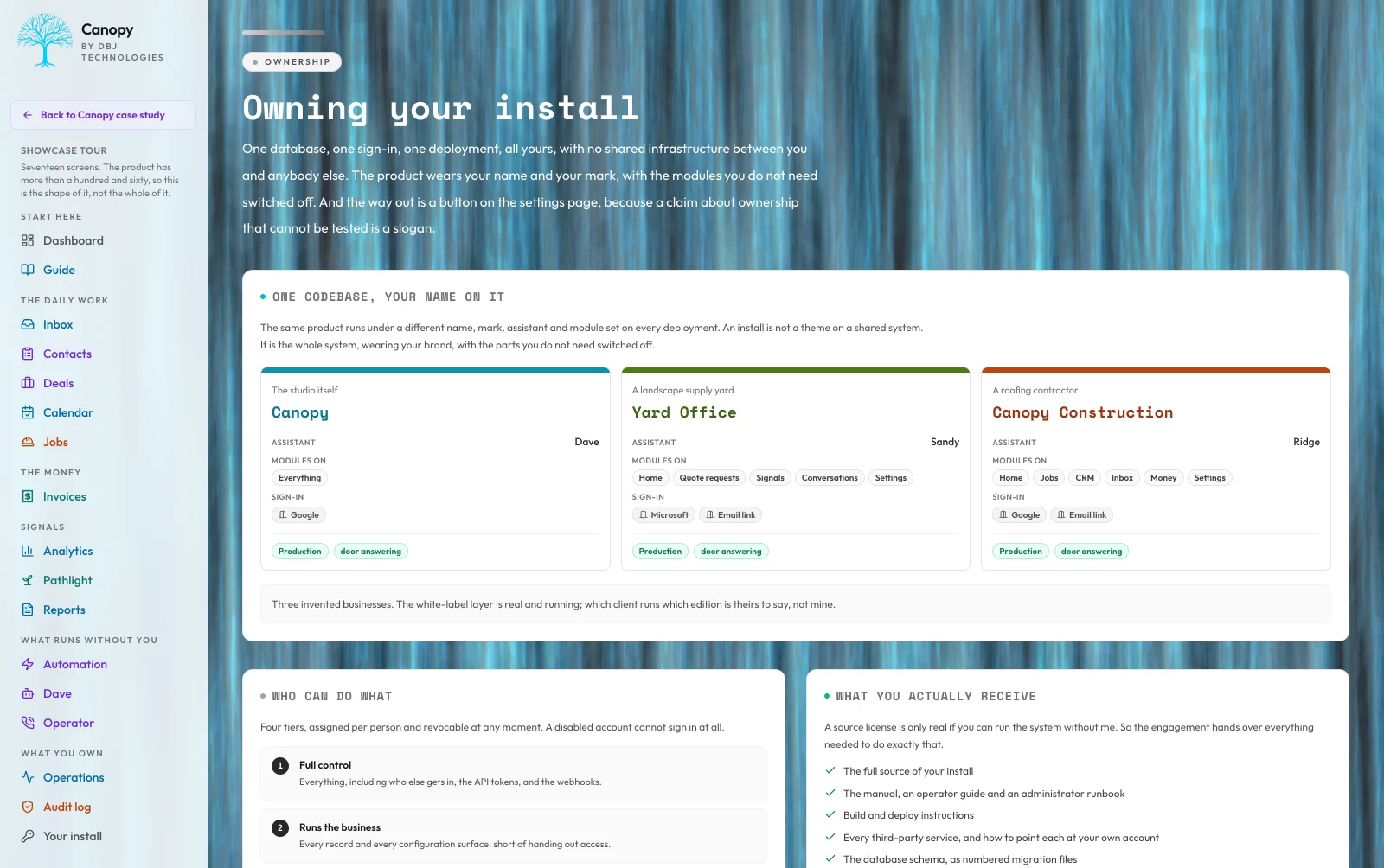
The fastest way to make a client portal feel like somebody else's software is to leave somebody else's name on it. So a Canopy install is not a theme over a shared system. It is the whole system, carrying the buyer's name, mark and colors, with the parts they do not need switched off. One codebase runs deployments that look and behave like different products: their own product name, their own logo, their own accent palette through the whole interface, their own assistant with its own name and its own opening line, their own sign-in doors, and their own module set. A business that has no mailbox in the portal does not get an empty inbox. A business that will never buy a scan does not get a tab for it sitting permanently at zero, inviting them to wonder what they are missing. That is the part of the ownership story you can actually test. The rest is architecture: one install is one database, one sign-in and one deployment, all the buyer's, with no shared infrastructure between them and anybody else. There is no central account of mine the data passes through. That is why the claim is honest rather than a slogan. There is literally nothing to leak across customers, because there are no other customers in the install. An install starts from an edition, the construction one where the job is the deal, or a pack for a real estate office or a CPA practice, and the business defines its own kinds of record on top. Access is five tiers, assigned per person and revocable at any moment, and a disabled account cannot sign in at all. Every entity exports to CSV and the whole database exports at once, from a control on the settings page rather than a support ticket, because the test ownership has to pass is that you can fire me and keep operating tomorrow morning.
Read the full architecture of Your Brand, Your Modules, Your Name On It →
The question this section answers: what has to be true before a buyer will put their own name on software somebody else built. One codebase runs deployments that read as different products: their own name, mark, palette, assistant, sign-in doors and module set. A business with no mailbox does not get an empty inbox. A business that will never buy a scan does not get a tab sitting permanently at zero. I considered one deployment serving every customer with branding resolved per request from the hostname, which is what almost everything in this category does. I rejected it because in that design the buyer's brand is a row my code looks up on every request. If the lookup is wrong for one release, the buyer's customer sees somebody else's company name on the buyer's own portal. The failure mode I most carefully guarded against is therefore removed rather than defended: one install is one database, one sign-in and one deployment. There is no tenant column anywhere that could be queried wrong, because there are no other customers inside the install. The honest exclusion: the white-label layer is real and running, but which client runs which edition is theirs to say, not mine. The three installs on the tour are invented. The operational consequence: the way out is a control on the settings page, not a support ticket, because ownership only means something if you can act on it on a Tuesday afternoon.
Continued at /work/canopy/brand
Architecture & Ownership
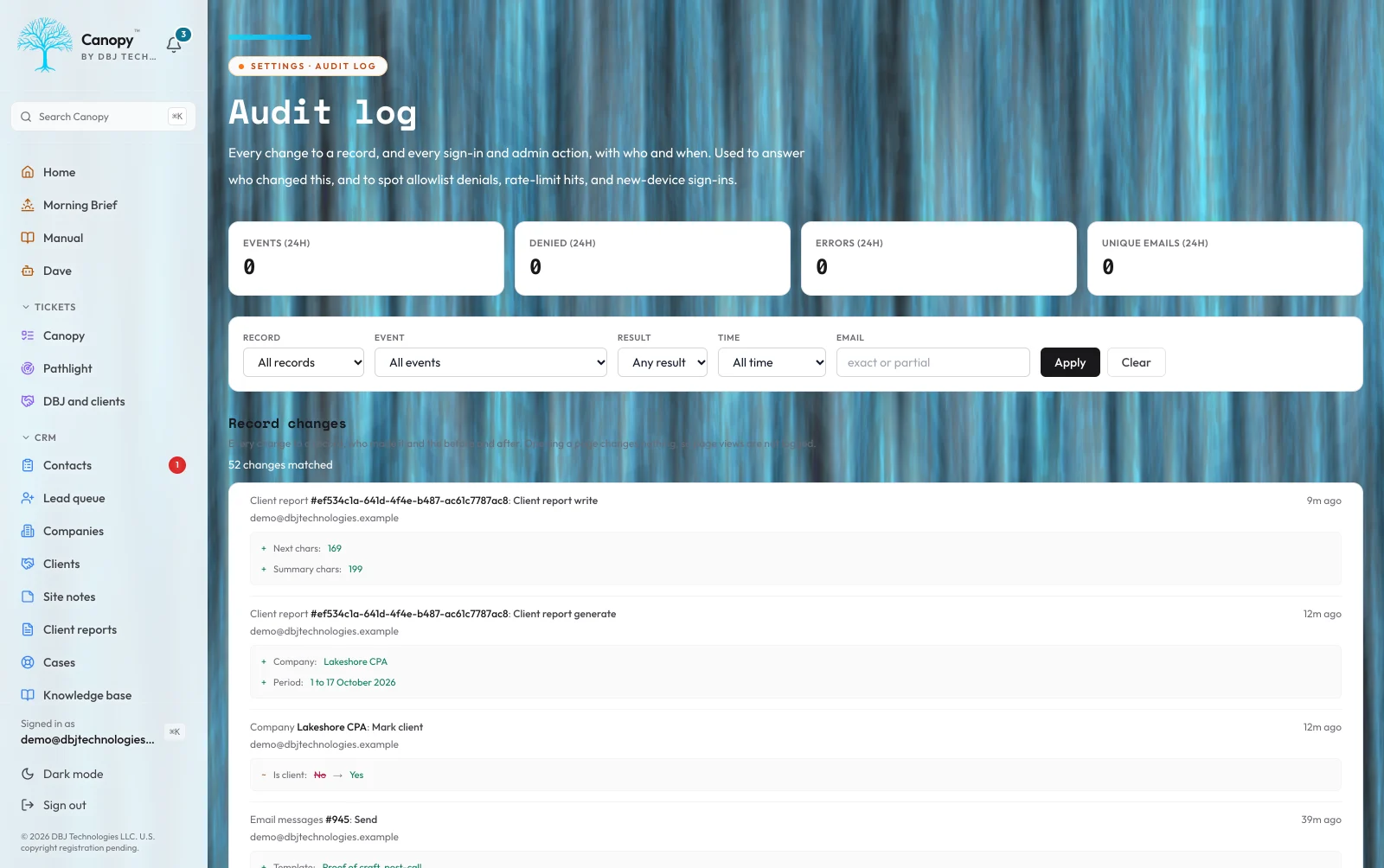
Most small-business software lives in someone else's data center, behind someone else's auth, governed by someone else's terms of service. The buyer rents access to their own data and pays a monthly subscription for the privilege. Canopy inverts that. Per-install Postgres database, per-install sign-in doors wired to an allow-list the buyer controls, per-install deployment to a Vercel project the buyer owns. No shared infrastructure between customers. No multi-tenant database to leak across accounts. No 'we are migrating you to a new region' email. The buyer's data sits in a database the buyer pays for directly, behind a domain the buyer paid the registrar for directly, with an SSL certificate issued to the buyer. Role-based access control gates who can see what, with multiple permission tiers configurable per install. Every meaningful entity change writes a before-and-after snapshot to the audit log, attributed to the user who made the change. The audit log is queryable. The role assignments are revocable. A versioned API under the buyer's own keys, and a read-only door for an AI agent over the same keys, let the install speak to anything the buyer connects. The whole architecture is the buyer's to inspect, modify, audit, or migrate away from. If I get hit by a bus, the buyer keeps their database, their auth, their domain, their data, and their operating system. That is what ownership actually means. That is the one-time build. On a monthly subscription I host the install and run it for you; it is still its own database and its own deployment with nothing shared with any other buyer, and the whole database still exports on any day.
Read the full architecture of Architecture & Ownership →
The question that shaped every other answer: who owns the data after the engagement ends. Most small-business software answers that question with the phrase 'we do.' Canopy answers it with the phrase 'you do.' Per-install Postgres database, per-install Google sign-in with an admin-only allow-list, per-install deployment to a Vercel project the buyer owns. The buyer pays Neon directly. The buyer pays Vercel directly. The buyer pays their domain registrar directly. There is no shared infrastructure between customers. There is no multi-tenant database to leak across accounts. There is no 'we are migrating you to a new region' email. I considered multi-tenant SaaS with row-level security and a master billing dashboard. The infrastructure is cheaper to run that way and the support story is simpler for me. I rejected it because every multi-tenant system I have ever read about has eventually leaked across tenants, and the buyer who matters is the one who reads the postmortem and remembers it. If the worst case for the buyer is a row appearing in someone else's data, that is too bad a worst case. Role-based access control gates who can see what, with multiple permission tiers configurable per install. Every meaningful change is attributable. Role assignments are revocable. The audit log is queryable. The operational consequence: a Canopy install can be inspected, modified, audited, or migrated away from without my permission. The buyer can fire me and keep operating tomorrow morning. That is the test ownership has to pass. That is the one-time build. On a monthly subscription I host the install and run it for you; it is still its own database and its own deployment with nothing shared with any other buyer, and the whole database still exports on any day.
Continued at /work/canopy/architecture
What Comes Next
Canopy is a productized engagement now, offered two ways: a one-time build or a monthly subscription. Either way it is scoped per buyer and delivers in about four to eight weeks. The Star Auto Service was install zero, the proving ground, and it runs the full stack live today. What you buy is the whole operating system, standing up on your own domain, in your own database, behind your own sign-in. On the one-time build, the source is licensed to you to run and modify in house. A quote is built from parts, not a round number: the implementation work to migrate, integrate, white-label, and customize; the internal-use source license; and, if I host it, a capped monthly line for hosting and support. Heavier customization and full Pathlight coverage carry the quote up. If you have a business with real revenue, SaaS sprawl, and the appetite to consolidate it into one install, the fastest way to find out if Canopy fits is a thirty-minute conversation. I will scope it, decompose the number, and show you the three-year cost of Canopy against the stack of subscriptions it replaces.
The technical decisions behind this build.
A Dedicated Stack for Every Install
Every install is its own database, its own auth wall, its own domain. No multi-tenant shared infrastructure that mixes one client's data with another's. No vendor login your team needs to remember. The dashboard, the data, and the keys all live where the buyer keeps the rest of their business.
First-Party Telemetry
Visitor analytics, Web Vitals, scroll depth, and dwell time captured from the buyer's own site and posted directly to the buyer's own dashboard. No third-party SDK loaded. No external script firing on every page. No data leaving the buyer's infrastructure to be aggregated elsewhere and resold. What is captured is what the buyer asked for, full stop.
Real Visitors, Not Crawler Noise
Bot pressure is real and most dashboards either over-count it (inflating vanity numbers) or under-count it (hiding a problem). Canopy separates bot traffic from humans at the ingest layer so the headline numbers reflect actual potential customers, while bot pressure is still surfaced honestly when the buyer wants to see it.
Privacy-First by Design
Raw visitor IPs are never persisted. Identifiers are first-party only, not third-party tracking cookies. The whole capture pipeline assumes the question 'can you defend this against a privacy challenge' will get asked, and the answer is yes. That stance also future-proofs the install against the next round of cookie deprecations.
Surfaced Before It Bites
Certificate, domain, and email-auth posture checked daily per tracked domain. Deployment health and email deliverability ingested in real time. The dashboard is fast even when the underlying data is large because it reads from already-aggregated views. Issues surface as warnings before they become outages.
Built first for DBJ Technologies as my own internal operating-system admin. The Star Auto Service in Richardson, TX is install zero, the first external proof that the architecture transfers cleanly off the studio's stack and onto somebody else's. Each install is delivered as the client's own infrastructure, in their own accounts, structured so they keep deploying it themselves long after the work is done.